Best 4K Projector Picks by Brightness and Throw
![WiMiUS [Built-in Apps/4K Support] Smart Outdoor Projector](https://m.media-amazon.com/images/I/51H3v1q5xyL._SL500_.jpg)
Six smart projectors compared on published brightness, throw ratio, weight and warranty, with a named winner and three conditions that flip the pick to something else.

By Josh MorganUpdated 16 min read
On this page
- Best 4k projector at a glance
- What "4K" means on a projector listing
- How these six picks were matched to buyers
- Why is brightness the real deciding number?
- 1. WiMiUS P62 Pro — Best overall
- 2. TOPTRO X9 PRO — Best premium
- 3. TOPTRO A2 — Most versatile
- 4. ONOAYO ONO3Pro 2.0 — Best upgrade
- 5. KOGATA GC357 — Best minimal setup
- 6. Magcubic HY300pro+ — Best budget pick
- Which best 4k projector fits your room size?
- What more money buys across this set
- The verdict
- FAQ
The best 4k projector in this group is the WiMiUS P62 Pro, because it pairs a stated 600 ANSI with dual HDMI, two USB ports and a 5.42 lb body that still fits a shelf. If your room never goes fully dark, the TOPTRO X9 PRO and its claimed 920 ISO ANSI is the better buy. Most shoppers compare resolution numbers first. That is the wrong comparison in this category, and every listing here quietly admits it.
Best 4k projector at a glance
| Pick | Brightness | Throw / size | Price |
|---|---|---|---|
Best overall WiMiUS P62 Pro |
600 ANSI claim | 3.35 x 11.8 x 9.84 in 5.42 lb |
Check Price |
Best premium TOPTRO X9 PRO |
920 ISO ANSI claim | 4.68 x 11.2 x 11 in 6.61 lb |
Check Price |
Most versatile TOPTRO A2 |
650 ISO ANSI claim | 1.0:1 short throw 4.16 lb |
Check Price |
Best upgrade ONOAYO ONO3Pro 2.0 |
"high brightness" claim | 3 x 8 x 6 in 2.2 lb |
Check Price |
Best minimal setup KOGATA GC357 |
HDR10+ claim, no ANSI given | 3.46 x 9.37 x 6.97 in 2.87 lb |
Check Price |
Best budget pick Magcubic HY300pro+ |
200 ANSI claim | 80 in from 5.2 ft 1.57 lb |
Check Price |




What "4K" means on a projector listing
Read the long titles carefully and a pattern shows up. WiMiUS describes "native 1080p with 4K support". TOPTRO describes "4K decoding with native 1080p resolution" on the A2. KOGATA calls the GC357 a "native 1080p outdoor projector" with "full decoding 4K". Magcubic says "4K support".
Those are all the same claim wearing different clothes. The projector accepts a 4K signal, decodes it, then puts it on the wall at 1080p. That is genuinely useful, because it means a 4K Blu-ray player or a console won't hand you a black screen. It is not the same as 4K on the wall.
So treat the term as a compatibility badge here, not a pixel count. A search for a best 4k projector returns these because they decode the format, and you have to judge the panel yourself from the wording in the listing. Nothing in this data lets me promise any of the six puts 3,840 pixels across your wall.
What that changes for you:
- Don't pay extra chasing the phrase itself. Every pick here carries it.
- Compare brightness and throw instead. Those figures differ enormously across this set.
- Check whether the listing says "native" or "support" before "4K". The word before matters more than the number after.
How these six picks were matched to buyers
I built this shortlist around four buyer profiles rather than a single score, because a garden projector and a bedroom projector are not the same purchase.
- The living-room default. One box, streaming apps built in, two HDMI inputs for a console and a soundbar, enough claimed brightness for a room with curtains. That is the WiMiUS P62 Pro.
- The bright-room buyer. Someone projecting before sunset or with lamps on. Brightness is the only number that helps them, so the highest published figure wins. That is the TOPTRO X9 PRO at a claimed 920 ISO ANSI.
- The small-room buyer. A wall a few feet away and nowhere to put a projector behind the sofa. Throw ratio decides this one, and only the TOPTRO A2 publishes a short-throw figure at 1.0:1.
- The occasional viewer. Kids' films, a dark bedroom, a tripod in the garden twice a summer. Weight and cost matter more than lumens.
Two things got picks cut from consideration. Listings with no weight or dimension figures at all were dropped, because a projector you can't place is a projector you can't use. So were listings with no warranty statement, which is why every pick here publishes something, from one year to a three-year repair term.
Why is brightness the real deciding number?
Because resolution is the same story across all six, and brightness is not.
The published figures in this set span 200 ANSI to a claimed 920 ISO ANSI. That is a gap of more than four times, between two boxes that both advertise 4K support in the title. TOPTRO makes the point bluntly on the X9 PRO listing, saying it "outperforms many that inflate their 3500 brightness claims". Take that as a competitor jab rather than proof, but the underlying logic holds: some brightness numbers are measured to a standard and some are marketing.
Watch for these words in the specification:
- ANSI or ISO ANSI: a standardised measurement. Both TOPTRO picks and the Magcubic quote it.
- "High brightness" with no number: ONOAYO uses this on the ONO3Pro 2.0. It tells you nothing comparable.
- No brightness figure at all: the KOGATA GC357 listing leads with HDR10+ and its MTK9660 chipset instead.
Brightness is what decides whether your picture survives the room. A 200 ANSI projector in a dark bedroom looks fine. The same unit at 7pm in a living room with a window looks grey and washed out, and no amount of 4K decoding fixes that. If you only compare one number when choosing the best 4k projector for your space, compare this one.
1. WiMiUS P62 Pro — Best overall
The most complete package here: a stated 600 ANSI, two HDMI ports and the longest warranty cover in the set.
Best for: a shared living room that needs one box for streaming, HDMI and sound Skip it if: you need to carry it between rooms often
What separates the P62 Pro from the rest of this set is port count. WiMiUS lists two HDMI inputs, with HDMI 1 supporting CEC and HDMI 2 supporting ARC and CEC, plus two USB ports and Wi-Fi 6. No other pick here publishes that combination. Two HDMI inputs means a console and a streaming stick both stay plugged in, which matters more day to day than any spec on the box.
The claimed 600 ANSI sits third of the six on published figures, behind both TOPTRO units. WiMiUS pairs it with HDR10 and describes the panel as native 1080p with 4K support. Audio is dual 10W speakers with Dolby audio and two-way Bluetooth 5.
Warranty is the standout. WiMiUS publishes a two-year money-back guarantee, three-year repair coverage and lifetime technical support. Every other pick tops out at two years.
The trade-off is bulk and portability. At 5.42 lb and 11.8 in wide, it's the second-heaviest here, and the 3.35 in height means it wants a shelf rather than a coffee table. If you're carrying a projector to the garden weekly, the 1.57 lb Magcubic or 2.2 lb ONOAYO does that job better.
Pros:
- Two HDMI ports, both with CEC support
- Two USB ports plus Wi-Fi 6
- Longest published cover in this set at three-year repair
- Stated 600 ANSI with HDR10
- Dual 10W Dolby-badged speakers
Cons:
- Second-heaviest pick at 5.42 lb
- Lower claimed brightness than either TOPTRO
- 11.8 in width needs real shelf depth
- Panel is native 1080p, not native 4K
2. TOPTRO X9 PRO — Best premium
The highest published brightness figure here, and the pick to reach for if your room won't go dark.

Best for: rooms with ambient light and a 100-inch-plus screen Skip it if: you want the lightest or the cheapest option here
The number that earns this the premium slot is a claimed 920 ISO ANSI, the highest published brightness in the group by a wide margin. TOPTRO specifies the ISO standard rather than a bare lumens figure, which is the more useful way to state it. Paired with 4K decoding and HDR10, that's the combination for a room where you can't kill every light.
Audio is the other gap. TOPTRO lists 2x20W dual-cavity speakers with Dolby Audio certification, double the wattage of the WiMiUS pick, plus Bluetooth 5.4 and HDMI ARC with CEC. Setup runs through an AI sensor and CMOS camera for auto focus, 6D keystone, obstacle avoidance and screen fit. Apple users get a specific advantage: TOPTRO lists official AirPlay 2 and HomeKit, and says no third-party app is needed.
It's also the most expensive pick here and the heaviest, at 6.61 lb across a 4.68 x 11.2 x 11 in body. Only one seller lists it, so you have no alternate source if that listing goes quiet. Warranty is two years, shorter than the WiMiUS repair term. Pay the premium for the brightness and the AirPlay support, not for portability.
Pros:
- Highest published brightness in this set, 920 ISO ANSI claim
- 2x20W speakers with Dolby Audio certification
- Official AirPlay 2 and HomeKit listed
- Bluetooth 5.4 and HDMI ARC with CEC
- Full auto setup with obstacle avoidance
Cons:
- Heaviest pick at 6.61 lb
- Most expensive of the six
- Only one seller lists it
- Two-year warranty, shorter than the WiMiUS cover
3. TOPTRO A2 — Most versatile
The only pick that publishes a short-throw ratio, which makes it the answer for tight rooms.
Best for: small rooms where the projector sits close to the wall Skip it if: you need a long throw from a rear shelf
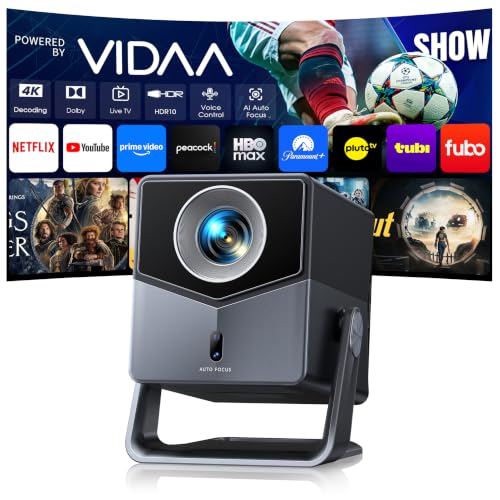
A 1.0:1 throw ratio is the A2's whole argument, and no other pick here states one. TOPTRO says that puts a 100-inch image on the wall from just a couple of feet away. For a bedroom, a flat with no rear wall, or a spot where a coffee table is the only surface available, that geometry solves a problem brightness cannot.
Brightness itself is a claimed 650 ISO ANSI with 4K decoding, native 1080p and HDR10. That's second-highest here on published figures, and above the WiMiUS winner. Audio runs 36W of Dolby Audio through dual 18W exposed speakers, with two-way Bluetooth 5.2 and HDMI ARC with CEC. The 200-degree rotating stand handles ceiling or angled projection without a mount.
Size is compact for the output: 4.16 lb and a 9.72 x 7.32 x 8.03 in body, the most cube-shaped of the group.
The catch with short throw is that it's a constraint, not just a feature. Place the A2 far back and the image outgrows your wall. It also runs VIDAA rather than a Google-based system, so app selection is whatever VIDAA carries. Warranty is two years, and the listing leans on live TV channels that may not match your region.
Pros:
- Only pick with a published short throw ratio, 1.0:1
- Claimed 650 ISO ANSI, second-highest here
- 36W Dolby Audio via dual 18W speakers
- 200-degree rotating stand, no mount needed
- Compact at 4.16 lb
Cons:
- Short throw limits how far back you can place it
- VIDAA app selection is narrower than Google-based systems
- Live TV channel count may not apply to your region
- Two-year warranty only
4. ONOAYO ONO3Pro 2.0 — Best upgrade
Three-year repair coverage and 2.2 lb at the second-cheapest position in this set.

Best for: someone upgrading from a bare-bones projector on a tight budget Skip it if: you want a published brightness figure before buying
The ONO3Pro 2.0 is the value anomaly here. At the second-cheapest price position, it carries a warranty statement most premium picks don't match: one year return, three year repair and lifelong support. Only the WiMiUS winner offers a comparable repair term, and it costs more.
Its other trick is size. At 2.2 lb across a 3 x 8 x 6 in body, this is the second-lightest pick and the smallest footprint of the six. That makes it the practical choice for a projector that lives in a cupboard and comes out for film nights. ONOAYO lists AI auto adjustment completing focus, keystone, obstacle avoidance, screen fit and orientation in three seconds, plus dual 50W speakers with Dolby Audio and eARC.
Here's where I'd hesitate. ONOAYO says "high brightness performance" and gives no ANSI number anywhere in the listing. Every other pick except the KOGATA publishes one. That absence is the single biggest unknown in this set, and brightness is the number that decides how the picture looks in your room. The 50W speaker figure is also unusually large for a 2.2 lb chassis, so treat the wattage as the manufacturer's claim rather than an indication of bass.
Pros:
- Three-year repair coverage at a low price position
- Second-lightest here at 2.2 lb
- Smallest footprint in the set, 3 x 8 x 6 in
- Full auto setup claimed in three seconds
- Dolby Audio with eARC listed
Cons:
- No ANSI brightness figure published anywhere
- 50W speaker claim is hard to square with a 2.2 lb body
- Only one HDMI arrangement described, unlike the WiMiUS pick
- Self-developed operating system, so app support is unproven
5. KOGATA GC357 — Best minimal setup
Auto focus with 6D keystone in a 2.87 lb body, aimed at a ceiling mount you never touch again.

Best for: guest rooms and ceiling mounts you set once and forget Skip it if: you want more than one year of warranty cover
KOGATA builds the GC357 around setup speed. The listing pairs auto focus with 6D keystone correction, and describes the projector as suited to bedroom and ceiling installation. At 2.87 lb and 3.46 x 9.37 x 6.97 in, it's slim enough to mount without heavy hardware and light enough that a small bracket does the job.
The hardware detail here is the most specific of the six. KOGATA names the MTK9660 chipset and a 2+8GB memory configuration, and states native 1080p with full 4K decoding. It's the only pick claiming HDR10+ rather than plain HDR10, and the only one listing DTS audio alongside Dolby. Wi-Fi 6 and Bluetooth handle streaming and iOS mirroring.
Two things hold it back. There is no brightness figure in the listing, which is a real gap for the second-most-expensive pick here: you're paying a premium position without a number to compare against the 920 ISO ANSI TOPTRO or the 600 ANSI WiMiUS. Warranty is one year, tied with the Magcubic for the shortest in the set, and only one seller lists it. If setup convenience is what you're buying, the auto-focus systems on both TOPTRO picks and the ONOAYO cover similar ground.
Pros:
- Specific chipset and memory detail, MTK9660 with 2+8GB
- Only pick claiming HDR10+
- DTS listed alongside Dolby Audio
- 2.87 lb slim body suits ceiling mounting
- Wi-Fi 6 with iOS mirroring
Cons:
- No brightness figure published
- One-year warranty, shortest here alongside the Magcubic
- Second-highest price position for no extra published capability
- Only one seller lists it
6. Magcubic HY300pro+ — Best budget pick
The cheapest and lightest pick here at 1.57 lb, honest about being a 200 ANSI dark-room projector.

Best for: kids' shows and casual viewing in a fully dark room Skip it if: any daylight reaches your wall
Magcubic does something the rest of this set doesn't: it tells you the limits up front. The listing states 200 ANSI with a 2000:1 contrast ratio and describes that as "sufficient brightness for casual movie watching, kids' shows, or gaming". It also recommends 5.2 ft of distance for an 80-inch screen, which is a genuinely useful placement figure that no other pick provides.
At 1.57 lb this is the lightest projector here by a clear margin, less than a quarter of the TOPTRO X9 PRO. It rotates 180 degrees and mounts to a ceiling, a table or a tripod, and Wi-Fi 6 with Bluetooth 5.4 handles streaming through built-in apps. The Air Mouse remote combines a pointer and a traditional remote, which makes app navigation less painful than a four-way d-pad.
The 200 ANSI figure is the whole story. That's roughly a fifth of the claimed brightness on the TOPTRO X9 PRO, and it means this projector needs darkness to look good. Turn on a lamp and the image fades. Auto keystone here is vertical only, so off-axis placement needs manual work, and warranty is one year. Take it as a second projector or a first one for a blacked-out room, not as your only screen.
Pros:
- Cheapest of the six
- Lightest here at 1.57 lb
- Published placement figure, 80 in from 5.2 ft
- Air Mouse remote for easier app navigation
- 180-degree rotation for ceiling or tripod use
Cons:
- 200 ANSI claim is the lowest in this set
- Needs a fully dark room to look right
- Auto keystone is vertical only
- One-year warranty, and no dimensions published
Which best 4k projector fits your room size?
Room geometry cuts this field faster than any feature list. Work through these in order.
- Wall less than 6 ft from where the projector can sit. Go short throw. The TOPTRO A2 at 1.0:1 is the only pick here that publishes the ratio, and it's built for exactly this.
- Wall 6 to 10 ft away, room can go dark. The Magcubic covers 80 inches from 5.2 ft, so it works at short distances too, provided the lights are off.
- Living room with a window, watching before dark. Brightness first. The claimed 920 ISO ANSI on the TOPTRO X9 PRO is the highest number in this set.
- Permanent ceiling mount. Weight matters. The KOGATA GC357 at 2.87 lb and the ONOAYO at 2.2 lb are the easiest to bracket.
- Console and streaming stick both connected. Port count decides. Only the WiMiUS P62 Pro publishes two HDMI inputs.
Measure before you buy. Grab a tape, note the distance from your intended shelf or ceiling point to the wall, and note the width of the image you want. A best 4k projector that can't reach your wall size is a return, no matter how good the panel is.
What more money buys across this set
The pattern here is not a smooth line from cheap to good.
At the entry positions, the Magcubic and the ONOAYO both buy you portability. The Magcubic is honest about 200 ANSI and needs darkness. The ONOAYO gives you a three-year repair term and 2.2 lb, but publishes no brightness figure at all, which is a lot of trust to place in a listing.
The middle of this set is where the value sits. The TOPTRO A2 adds a published 650 ISO ANSI and the only short-throw ratio here. The WiMiUS P62 Pro adds 600 ANSI, two HDMI ports, two USB ports and the longest warranty cover in the group. Both give you numbers you can compare rather than adjectives.
At the top, you're buying one specific thing each. The TOPTRO X9 PRO buys brightness, at a claimed 920 ISO ANSI, plus 40W of speakers and AirPlay 2. The KOGATA GC357 buys chipset detail and HDR10+ but leaves brightness unstated, which is why it doesn't lead this guide despite its price position.
The lesson: spend up for a bigger measured number, not for a longer feature list.
The verdict
Three tiers, three answers.
At the entry level, take the Magcubic HY300pro+ if your room goes properly dark. It's the cheapest and lightest here at 1.57 lb, and its 200 ANSI claim is stated plainly rather than dressed up. Use it in a blacked-out bedroom or after sunset outdoors and it does the job. Use it at 4pm and you'll be disappointed.
In the middle tier, the WiMiUS P62 Pro is the pick and the overall winner. A stated 600 ANSI, HDR10, two HDMI ports with CEC, two USB ports and Wi-Fi 6 make it the one box that handles a console, a soundbar and streaming without a hub. The three-year repair coverage plus two-year money-back term is the longest published cover in this set, and that matters on a device with a lamp and a fan inside. The trade-off is 5.42 lb and an 11.8 in width, so it wants a permanent home.
At the premium end, the TOPTRO X9 PRO earns the spend on one number: a claimed 920 ISO ANSI, the highest here. If you watch before dark or want a 100-inch-plus image, that brightness is the advantage the WiMiUS cannot match, and the 2x20W speakers and AirPlay 2 support are real extras. The cutoff is ambient light. Dark room, go WiMiUS. Lamps on, go TOPTRO.
FAQ
Is a best 4k projector worth it over a 1080p model?
A best 4k projector is worth it mainly for signal compatibility, not extra pixels on the wall. Every pick here decodes 4K but projects native 1080p, so a 4K console or Blu-ray player will display without handshake problems. If your sources are 1080p streaming only, the money is better spent on a higher brightness figure instead.
Does 4K support mean the picture is actually 4K?
4K support does not mean the picture is 4K. WiMiUS, TOPTRO and KOGATA all describe their panels as native 1080p with 4K decoding or support. The projector takes the higher-resolution signal and scales it down to display. That's useful for compatibility and it does look sharp, but it is not a native 4K panel.
What brightness do I need for a living room with lamps on?
For a living room with lamps on, aim for the highest published ANSI figure you can find. In this set that's the TOPTRO X9 PRO at a claimed 920 ISO ANSI. The 200 ANSI Magcubic needs full darkness. Anything in between, like the 600 ANSI WiMiUS or the 650 ISO ANSI TOPTRO A2, wants curtains drawn or an evening start.
WiMiUS P62 Pro or TOPTRO X9 PRO: which should I buy?
Choose between the WiMiUS P62 Pro and TOPTRO X9 PRO on light and ports. The WiMiUS wins on connectivity, with two HDMI inputs, two USB ports and the longest warranty cover here at three-year repair. The TOPTRO wins on brightness, 920 ISO ANSI against 600 ANSI, plus 2x20W speakers and AirPlay 2. Bright room, TOPTRO. Everything else, WiMiUS.
What mistake do first-time projector buyers make most?
The mistake first-time projector buyers make most is ignoring throw distance. People buy on resolution and brightness, then discover the projector can't produce their intended image size from the only shelf available. Measure the distance to your wall first. The TOPTRO A2 at 1.0:1 exists precisely because so many rooms are too small for a standard throw.
Start with a tape measure, not a spec sheet. Note the distance from your shelf or ceiling point to the wall, then decide how dark your room actually gets at the hour you watch. Those two answers eliminate four of these six picks in about a minute. If both come out flexible, the WiMiUS P62 Pro is the sensible default, because two HDMI ports and a three-year repair term keep it useful long after the novelty of a new projector wears off. That combination is rarer in this category than any brightness claim.